Vocalsthatsitinthemix.Withoutridingthefader.
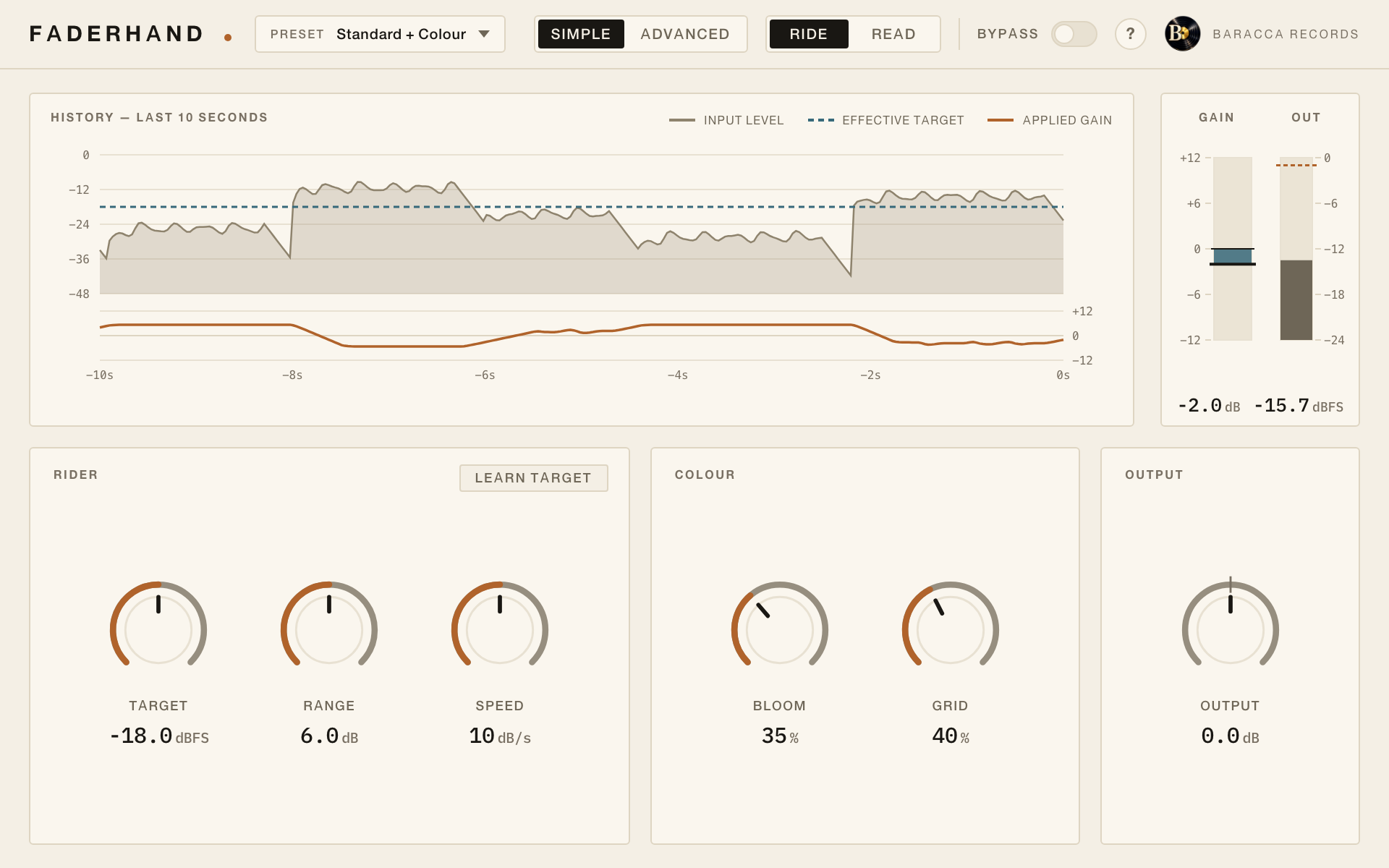
Switch it off to see the headline as it was sung. The numbers are the gain Faderhand gives each word.
Faderhand makes the slow level moves an engineer would make by hand, phrase by phrase, so your compressor only has to catch what is left.
9EURyours to keep · up to 3 computers · no iLok · 14 days to change your mind
Hear the same vocal before and after.
One take, one pass through Faderhand, nothing else. The amber line is the gain it actually rode.
A verse sung close to the mic. A chorus belted from a step back. A last word that falls away.
Before a vocal can sit, somebody has to even that out. Riding the fader takes a pass per song, and drawing automation syllable by syllable takes longer.
Leaving it to the compressor squashes the loud lines to lift the quiet ones. Faderhand does the riding instead: slow, musical moves toward a level you choose, before the compressor ever sees the signal.
Learn. Ride. Keep the moves.
Learn
Play the vocal and click Learn target. After six seconds of singing the target sits where your vocal already is, so it gets even, not louder.
Ride
Faderhand moves the level by up to 6 dB either way while the song plays, quickly enough that no phrase jumps before it gets there. You get on with the mix.
Keep the moves
In Ride mode every move goes to one parameter your DAW can record as automation. Switch to Read, and redraw any word by hand.
Riding in Pro Tools.
Faderhand on a lead vocal in Pro Tools, Standard preset. While the song plays, every move is written to the Ride automation lane, ready to play back or redraw.
The whole signal path, in order.
Nothing hidden: this is everything your vocal passes through. The dashed stages are off until you turn them up.
- DetectorK-weighted · 50 ms
- Lookahead100 ms
- Rider±6 dB · 40 dB/s
- Bloom2nd harmonic(optional)
- Grid2 + 3 kHz(optional)
- Outputceiling −1 dBFS
- Detector
- Listens to the vocal the way ears weigh it, and to the music bus too if you send one, so the target can follow the backing track.
- Lookahead
- The audio waits a moment, so the gain is already moving when a loud phrase arrives, not after it.
- Rider
- Follows your target closely enough that the gain is already there when a phrase changes, pulls loud lines down twice as fast as it lifts quiet ones, and leaves breaths and pauses alone.
- Bloom
- Warmth, if you want it: a clean second harmonic that stays in proportion on quiet and loud lines.
- Grid
- Presence, if you want it: a gentle lift where a vocal speaks.
- Output
- Boosts never push peaks past your ceiling, and a 2 ms lookahead limiter holds the line. Below it, audio passes untouched.
On the back panel.
Faderhand 1.1Baracca RecordsPrague
- Formats
- Mac: VST3, Audio Unit, AAX (Pro Tools), standalone app. Windows: VST3, standalone app
- System
- macOS 11.0 or newer, Apple Silicon and Intel; Windows 10 or 11, 64-bit
- Latency
- 102 ms at default settings, constant; 10 ms with the Live Vocal preset
- Sidechain
- Optional input for the music bus, stereo (mono in Pro Tools)
- Automation
- Ride parameter to record and play back
- Views
- Simple and Advanced, hover help on every control
- Presets
- 12, from Gentle to Upfront: Pop Lead, Ballad, Rap & Spoken, Podcast & Voice-over, Live Vocal and more
- Licence
- Perpetual, 3 computers, activate once, then offline
- Languages
- Interface help and manual in English, Czech and Spanish
- Installer
- Mac: signed and notarised by Apple. Windows: not code-signed yet
- Privacy
- No audio, project data or analytics leave your computer

Faderhand is made in Prague by Tomáš Jochmann, jazz pianist, producer and developer, under his label Baracca Records. Questions go straight to him, in English or Czech, and get an answer within three working days.
9 EUR. Yours to keep.
- One payment, no subscription
- Up to 3 computers, Mac or Windows; deactivate one to move the licence
- No iLok and no account: activate once online, then work offline
- All 1.x updates free
- Changed your mind? Within 14 days you get the full price back
9EUR
Buy for 9 EURPrice includes VAT. Checkout by Stripe, where the purchase is shown as “Sold through Link”. Buying means you agree to the Terms of Sale and the Licence Agreement. Terms of Sale · Licence Agreement
Questions people ask first.
Is it a compressor?
No. A compressor reacts within milliseconds and shapes every note. Faderhand moves the level slowly, phrase by phrase. Put it before your compressor, which then has less to do.
Will it make my vocal louder?
Not with Learn target: the target is set to the level your vocal already has, so the overall level stays where it was and the differences shrink. It also never boosts a phrase past your ceiling.
Which DAWs does it work in?
On a Mac, any host that loads VST3, Audio Unit or AAX plugins, including Pro Tools. On Windows, any host that loads VST3 plugins; it is tested in Reaper. The manual has automation notes for Logic Pro, Ableton Live, Reaper and Pro Tools.
Is there a Windows version?
Yes: the VST3 plugin and the Faderhand app for Windows 10 and 11, 64-bit. Audio Unit and AAX are Mac-only formats. The Windows installer is not code-signed yet, so Windows may ask you to confirm before it runs; the download page shows how.
Does it need the internet?
Once, to activate. After that Faderhand works offline and never checks again.
Why is there no trial?
Instead, listen to the examples, read the whole manual, and if it still isn't right in your own sessions, write to us within 14 days of buying and you get your money back.
How do I get my money back?
Write to info@baraccarecords.com within 14 days of buying. We refund the full price to your original payment method and block the licence key.
How many computers can I use?
Three at a time. Deactivate one from the plugin to move the licence to another computer.
Are updates free?
Every 1.x update is free.
What data does it send?
No audio, no project data and no analytics. Activation sends the licence key and an anonymised computer ID.